A facility manager overseeing a 400,000-square-foot corporate campus in 2026 manages four disconnected service layers: front-desk reception, internal mail and parcel delivery, floor-by-floor cleaning, and after-hours security patrol. Each layer runs on its own schedule, its own staffing roster, and its own budget line — and none of them talk to each other. The result is a building that runs on silos: the cleaning crew doesn't know which floors the delivery robot already visited, the security guard doesn't know the reception robot checked in a visitor at 7 PM, and the facility manager spends Monday mornings reconciling four separate service reports.
Smart building service robots change this equation. When delivery, cleaning, security, and reception robots share a unified fleet management platform — and that platform integrates with the building's existing IoT and BMS infrastructure — a corporate campus transforms from four disconnected service layers into one orchestrated automation system.
This guide is written for facility managers, building operators, and procurement teams evaluating whether — and how — to deploy a fleet of service robots across an entire office building or corporate campus. It covers the integration architecture, the robot types that deliver the highest ROI per square foot, and the procurement framework that separates production deployments from isolated pilots.

Why Smart Buildings Need Robot Orchestration — Not Just Robot Pilots
Most commercial buildings that have "adopted robots" in 2026 have actually done something much smaller: they've deployed a single robot type in a single use case. A delivery robot on floor 3. A cleaning robot in the lobby. A reception robot at the front desk. These are robot pilots — not building automation.
The gap between a pilot and a production deployment comes down to three integration layers that most procurement processes skip:
Layer 1: Multi-Robot Fleet Orchestration
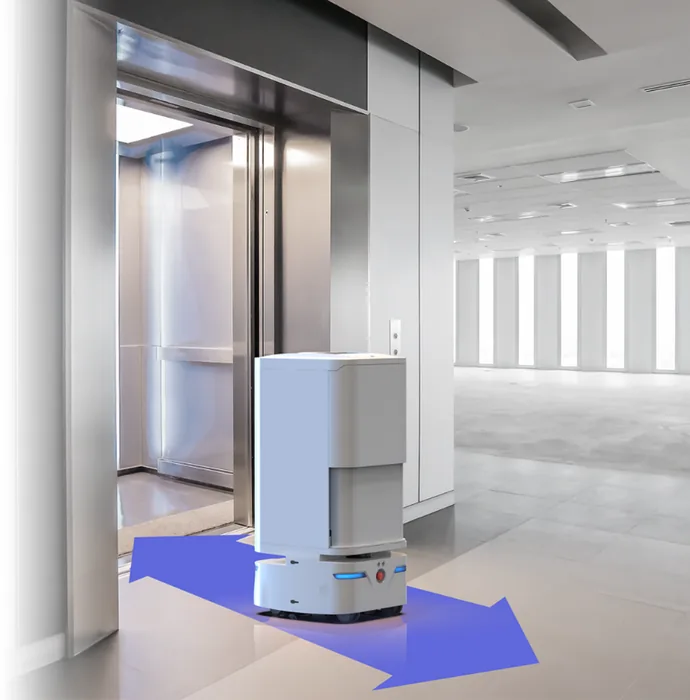
A corporate campus with 2,000 employees across 8 floors needs multiple robot types working simultaneously: CADEBOT units delivering inter-office mail and parcels, CLEINBOT units handling overnight floor scrubbing, a CRUZR unit managing visitor check-in, and patrol units covering perimeter security after hours. Without a unified fleet management platform, each robot type runs on its own scheduling system — creating conflicts in elevators, charging stations, and corridor traffic patterns. Modern fleet orchestration platforms — the same multi-robot orchestration systems used in hospitals and warehouses — assign priority levels, schedule charging windows, and resolve path conflicts automatically across heterogeneous robot fleets.
Layer 2: Building Systems Integration
The difference between a robot that works in a building and a robot that works with a building is API integration with three systems: the elevator control system (so robots can call and ride elevators without human escorts), the access control system (so robots can pass through secured doors during after-hours patrol), and the BMS (so the building knows which floors have been cleaned, which deliveries are in progress, and where every robot is at any given moment). For the access control integration component specifically, see our detailed analysis of security patrol robot deployments and ACS correlation requirements.
Layer 3: Data Unification
When a cleaning robot's sensor data shows higher-than-normal particulate levels on floor 5, and the HVAC system's air quality sensors confirm the same spike, a unified platform can correlate these signals and trigger a maintenance alert — before anyone complains. Without data unification, the cleaning robot's report sits in one dashboard, the HVAC data sits in another, and the facility manager connects the dots manually three days later.

The Four Robot Categories Every Smart Building Needs
Not every building needs every robot type. The deployment matrix depends on square footage, employee count, visitor volume, and existing staff coverage. Here is the category-by-category evaluation framework:
Delivery Robots: The Highest-ROI Entry Point
Internal logistics — moving mail, parcels, documents, and catering between floors — consumes an estimated 8–12% of administrative staff time in large office buildings, according to facilities management benchmarks. A single CADEBOT L100 unit operating 16 hours per day can handle 80–120 internal deliveries across 8 floors, with multi-elevator navigation eliminating the need for a human escort. For buildings with more than 500 employees, the payback period on a delivery robot deployment typically falls between 8 and 14 months — faster than any other robot category. For a detailed analysis of delivery-specific selection criteria, see our delivery robot selection guide covering single vs. dual cabin configurations.
The key procurement decision in the delivery category is capacity vs. frequency. Buildings with centralized mailrooms and scheduled delivery runs (morning and afternoon batches) benefit from high-capacity units like the AOMAN DOUBLE with its 70L dual-cabin design. Buildings with on-demand delivery requests (executive floors, legal departments, finance teams) benefit from smaller, faster units that can make 20–30 trips per shift.
Cleaning Robots: Overnight Automation That Pays for Itself
Commercial office cleaning is a $74 billion global market dominated by contract labor. The cost structure is straightforward: $0.12–0.25 per square foot per cleaning, with labor representing 65–75% of the total. An automated cleaning robot operating on a programmed overnight schedule replaces contract labor for hard-floor areas at roughly $4–6 per hour (amortized over a 3-year lease) versus $25–40 per hour for contract cleaning staff.
The CLEINBOT M79 handles 2,000 m² per hour on hard surfaces with auto-return docking for water refill and drainage — translating to roughly 16,000 m² per 8-hour overnight shift. A single unit covers the hard-floor common areas (lobbies, corridors, cafeterias, conference center) of a typical 200,000-square-foot office building. For buildings with carpeted office floors, the cleaning robot handles common areas while contract staff handles individual offices — reducing the contract cleaning bill by 40–60% rather than replacing it entirely. For a broader evaluation of cleaning robot options, see our commercial cleaning robot buyer's guide.
Reception and Concierge Robots: The Visitor Experience Layer
The reception desk is the most staff-intensive single point in a corporate building: a full-time receptionist costs $45,000–65,000 annually in North America, and a building with 200+ daily visitors typically needs two receptionists to avoid queues at peak hours. A humanoid service robot like CRUZR handles visitor check-in, wayfinding, and basic inquiries — freeing human receptionists to handle complex requests, security escalations, and VIP hand-offs. For the full deployment playbook, including integration with visitor management systems, see our dedicated guide on reception and concierge robot deployments in corporate lobbies.
The visitation pattern determines the deployment model. Buildings with predictable visitor flow (9 AM–5 PM, pre-registered guests) can deploy a reception robot as the primary check-in point with human backup. Buildings with high walk-in traffic or frequent unregistered visitors should position the robot as a supplementary information kiosk rather than the primary check-in station.
Security Patrol: The 24/7 Coverage Multiplier
Night-shift security patrol is the most expensive coverage gap in commercial buildings. A single guard post requiring 24/7 coverage costs $380,000–$650,000 annually (4.2 FTE guards to cover shifts, weekends, and leave). An autonomous patrol robot covering the 18:00–06:00 shift — parking structures, perimeter corridors, loading docks — replaces 1.5 FTE night guards at roughly 10–15% of the equivalent cost. When the patrol robot integrates with the building's existing VMS and access control system, it doesn't just patrol — it correlates access events, thermal anomalies, and video feeds into a single security operations dashboard.
The ROI is strongest in multi-building campuses where patrol routes are long (45–90 minutes on foot) and after-hours coverage is thin. Data centers, corporate campuses with parking structures, and buildings in high-liability urban locations see the fastest payback — typically 12–18 months.

The Integration Architecture: How Four Robot Types Become One System
The single most common failure mode in smart building robot deployments is treating each robot category as an independent procurement decision. The result: four vendor dashboards, four scheduling interfaces, four maintenance contracts, and zero cross-robot coordination.
The correct architecture treats the building itself as the integration platform:
The Fleet Management Layer
A single fleet management dashboard should provide: (a) real-time location and status of every robot in the building, (b) unified scheduling with priority-based conflict resolution for elevator and corridor access, (c) centralized alerting that routes cleaning exceptions, delivery failures, and security anomalies to the appropriate response team, and (d) cross-robot analytics — for example, correlating cleaning completion data with delivery traffic patterns to optimize overnight scheduling.
The Building Systems Layer
Three integration points are mandatory for production deployment:
Elevator API integration: Robots must be able to call elevators, select floors, and confirm arrival without human intervention. This requires either a BACnet/IP interface to the elevator controller (preferred) or a physical IoT bridge device that emulates button presses. Budget 4–6 weeks for elevator integration — it's the longest lead-time item in any deployment.
Access control integration: Robots traversing secured doors during after-hours patrol or overnight cleaning need credential-based door access. This requires the access control system (Lenel, Genetec, Honeywell) to recognize the robot's digital credential and log the event. Without this integration, the robot's patrol route is limited to public corridors — eliminating parking structures, server rooms, and loading docks from coverage.
WiFi coverage audit: A robot navigating autonomously relies on continuous network connectivity for SLAM updates and fleet management communication. Every corridor, stairwell, parking level, and elevator shaft on the patrol route must have ≥-67 dBm WiFi signal strength. A pre-deployment WiFi survey typically identifies 15–25% of the patrol route as needing additional access points.
The Data Layer
The integration payoff comes when robot-generated data feeds into the building's existing analytics. Examples that facility managers care about: cleaning robot particulate sensors triggering HVAC filter replacement alerts, delivery robot traffic patterns identifying underutilized corridors for energy-saving HVAC zone adjustments, and security robot patrol logs providing compliance documentation for insurance audits.
For the underlying navigation technology that enables all of this — the SLAM and sensor fusion stack powering autonomous robot movement — the core principles apply identically whether the robot is delivering mail, scrubbing floors, or patrolling corridors.
Procurement Framework: 8 Questions Every Facility Manager Should Ask
Before issuing an RFP for building-wide robot deployment, confirm the answers to these eight questions. They are ordered by the cost of getting the answer wrong:
Does the vendor provide a unified fleet management platform, or separate dashboards per robot type? — A vendor offering delivery, cleaning, and security robots but requiring three separate dashboards is selling three products, not one platform. The integration work falls on your IT team.
What elevator controllers has the vendor integrated with? — Ask for a specific list of elevator controller models (Otis Compass, Schindler PORT, KONE Destination) and recent deployment references. If the answer is "we can integrate with anything via BACnet," ask for the name of the facility manager at the last building where they did it.
What is the WiFi signal strength requirement, and does the vendor provide a pre-deployment site survey? — The correct answer is "≥-67 dBm throughout the patrol/operating route, and yes, the site survey is included in the deployment fee."
How does the fleet management system handle elevator conflicts between robot types? — When a delivery robot, a cleaning robot, and a security robot all need the same elevator at 2 AM, what determines priority? The answer should reference a configurable priority matrix, not "it hasn't come up yet."
What is the total cost of ownership over 3 years, broken out by hardware lease, software licensing, integration fees, maintenance, and per-robot annual service? — Require a single line-item table in the proposal. If the vendor can't produce one, the hidden costs will surface after contract signing.
What cybersecurity certifications does the fleet management platform hold? — Robots are network-connected cameras and microphones on wheels. Require SOC 2 Type II or ISO 27001 certification for the cloud platform. For on-premise deployments, require documented network segmentation and encrypted robot-to-platform communication.
What is the SLA for multi-robot deployments? — A single-robot pilot can tolerate 48-hour repair turnaround. A building with 8 robots handling delivery, cleaning, and security cannot. Require 4-hour remote response and 24-hour on-site service for critical failures.
Does the vendor provide a dedicated deployment project manager, or is deployment self-service? — A building-wide multi-robot deployment involves elevator integration, access control configuration, WiFi remediation, staff training, and change management. The deployment PM should have completed at least 3 multi-robot building deployments.

The Deployment Timeline: From Site Survey to Full Autonomy
A realistic deployment timeline for a corporate campus with 4–8 robots across 3–4 categories:
- Weeks 1–2: Site survey, floor plan digitization, WiFi coverage audit, elevator controller and access control system integration scoping
- Weeks 3–4: Robot mapping runs (each robot is walked through its operating area to build its SLAM map), patrol and delivery route configuration, cleaning zone definition
- Weeks 5–6: Elevator integration testing, access control credential provisioning, supervised autonomous operation with human monitor on standby, alert threshold tuning
- Weeks 7–8: Cross-robot coordination testing (elevator conflict resolution, charging station scheduling), staff training for robot interaction and exception handling
- Week 9: Go-live with 24/7 autonomous operation across all robot categories, first-week hypercare support
- Months 3–4: Route optimization based on actual traffic patterns, cleaning schedule refinement based on utilization data, alert threshold fine-tuning
- Month 6: Full ROI review — compare actual staff hour reduction, service coverage improvement, and operational cost against pre-deployment baseline
The single most critical success factor — validated across 50,000+ deployed robots — is executive sponsorship from the facility director, not just the IT or procurement team. When the facility operations team owns the deployment, the integration work gets prioritized. When IT drives it and hands it off to facilities at go-live, the robots become expensive hallway decorations within 6 months.
The ROI Equation: What Building-Wide Automation Actually Costs
For a 400,000-square-foot corporate campus with 2,000 employees, here is a representative deployment configuration and its economics:
| Robot Type | Units | Monthly Lease (per unit) | Annual Cost |
|---|---|---|---|
| Delivery (CADEBOT L100) | 3 | $2,800–4,200 | $100,800–151,200 |
| Cleaning (CLEINBOT M79) | 2 | $3,500–5,500 | $84,000–132,000 |
| Reception (CRUZR) | 1 | $2,200–3,500 | $26,400–42,000 |
| Security Patrol | 2 | $3,500–6,000 | $84,000–144,000 |
| Fleet Management Platform | — | $1,500–3,000 | $18,000–36,000 |
| Total Annual Robot Cost | 8 units | — | $313,200–505,200 |
Against this, the staffing costs that robots partially or fully offset:
| Role | FTE Replaced/Reduced | Annual Cost Offset |
|---|---|---|
| Mailroom/internal delivery staff | 1.5–2.5 FTE | $67,500–150,000 |
| Contract cleaning (hard floors) | 40–60% of floor-area contract | $48,000–96,000 |
| Night security guard shifts | 1.5–2.0 FTE | $82,500–170,000 |
| Reception staff (peak-hour support) | 0.5–1.0 FTE | $22,500–65,000 |
| Total Annual Labor Offset | — | $220,500–481,000 |
The net annual impact ranges from a net cost of $92,700 (conservative leasing, modest labor offset) to a net savings of $167,800 (competitive leasing, maximum labor reduction). Most buildings fall in the middle: roughly cost-neutral in Year 1, net-positive by Year 2 as route optimization and staff reallocation take effect. For a deeper analysis of the financial framework, see our comprehensive service robot ROI guide.
The financial case strengthens considerably when the building is new construction or undergoing major renovation — because elevator integration, WiFi infrastructure, and charging station electrical work can be folded into the construction budget rather than retrofitted.

The Decision Framework: Is Your Building Ready?
Not every building is ready for multi-robot deployment in 2026. The readiness checklist:
| Readiness Factor | Ready | Not Ready |
|---|---|---|
| Building size | ≥150,000 sq ft | <80,000 sq ft (single cleaning robot + reception may still work) |
| Employee count | ≥500 | <200 (ROI math doesn't close) |
| Elevator integration | BACnet/IP-enabled controllers or upgrade path | Proprietary closed-loop controllers with no API |
| WiFi coverage | ≥-67 dBm in all operating areas | Dead zones in corridors, stairwells, parking |
| Facility management ownership | Single FM team across building | Fragmented: different vendors per service layer |
| Executive sponsor | Facility Director champions deployment | IT-driven with no FM buy-in |
Buildings that check all six boxes are deployment-ready. Buildings missing one or two factors can still deploy — but should start with a single robot category (typically delivery, which has the fastest standalone ROI) and expand to multi-robot orchestration once the integration infrastructure is proven.
Ready to evaluate building-wide robot automation for your facility? Contact our solutions team to schedule a site assessment, reference call with a deployed multi-robot building operator, and a customized ROI projection based on your building's square footage, headcount, and current service costs.